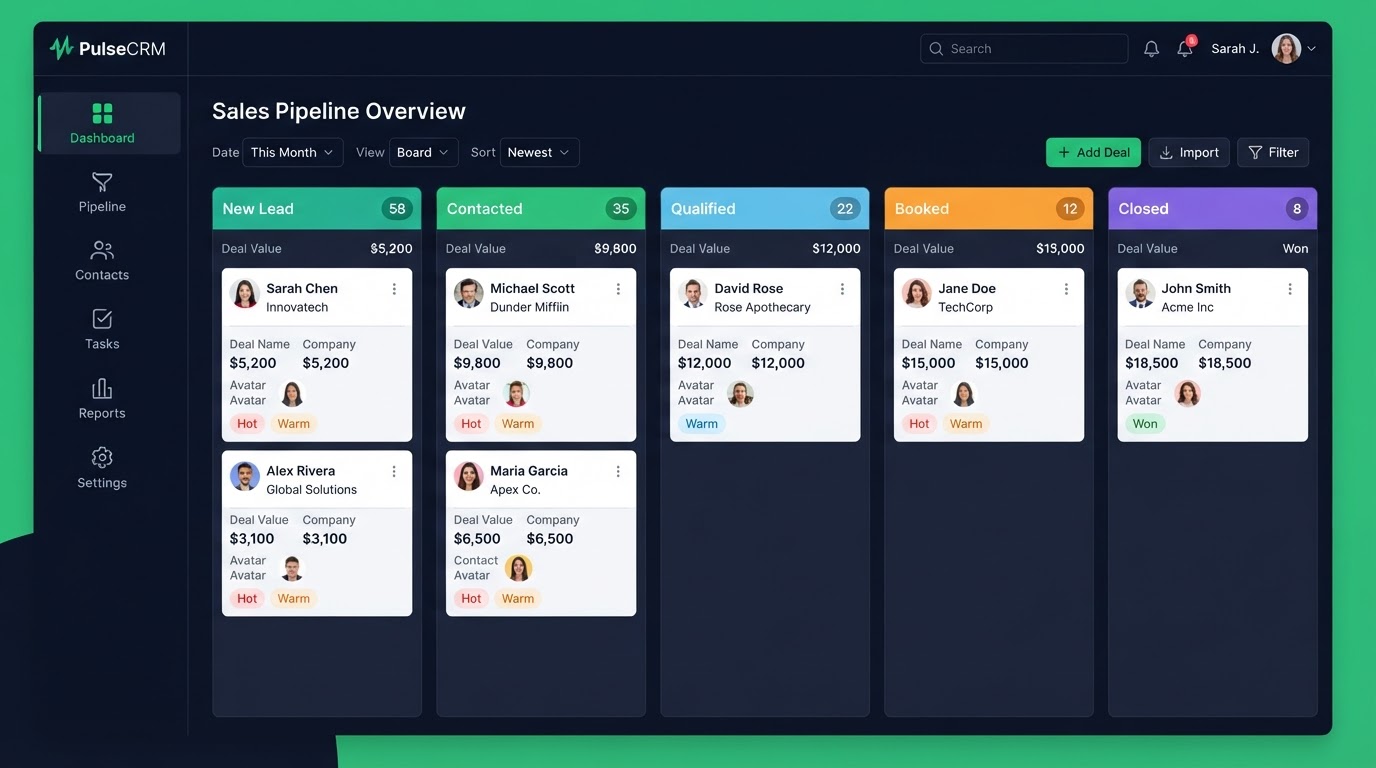
CRM & Pipeline Setup
We map your actual sales stages into custom pipelines, set up opportunity fields, automation triggers, and reporting dashboards so every lead is visible, scored, and never falls through the cracks.
Who this is for
Any business owner or sales team that has outgrown spreadsheets and needs a single source of truth for every opportunity.
What's included
- Custom pipeline stages mapped to your sales process
- Custom fields for opportunity data
- Stage-change automation triggers
- Lead scoring and routing rules
- Reporting dashboard setup
- Contact record and tag architecture
- Loom walkthrough of pipeline management
A CRM that is just a contact list is an expensive address book
Most businesses have a CRM, but it is just a list of names. Leads sit in it with no stage, no next step, and no follow-up. No one knows which lead is hot, which is cold, and which was forgotten three weeks ago. A pipeline changes this. It turns a flat list into a moving board where every lead has a stage, an owner, and a next action. You can see your entire sales process at a glance, and nothing gets forgotten.
Stages that match how you actually sell
A generic pipeline with stages like 'New, Working, Won' does not reflect how you sell. We map your pipeline to your real sales process — the actual steps a lead takes from first contact to closed deal. For a real estate agent that is New Lead, Contacted, Showing Booked, Offer Made, Closed. For a law firm it is Intake, Qualified, Consultation Booked, Retained. The pipeline mirrors your business, not a template.
Automation attached to every stage
A pipeline with no automation is a board you have to push by hand. We attach automation to every stage so the system moves leads forward for you. A lead enters 'Showing Booked' and the agent gets a task and the client gets a reminder. A deal moves to 'Closed' and a thank-you and referral request fire automatically. The pipeline does not just track your sales — it drives them.
- Stage changes trigger tasks for the right team member automatically
- Each stage has its own follow-up sequence attached
- Leads never sit idle because the system nudges them forward
- You see the whole pipeline at a glance with no manual updating
Custom fields that capture what matters to you
Every business has information that matters and that generic CRMs do not capture. We set up custom fields for the data that drives your sales — property type for real estate, practice area for law, treatment type for dental. The CRM captures the information you actually use to qualify and follow up, not just a name and email.
Tags and segments for targeted follow-up
Not every lead gets the same message. We set up tags and segments so you can follow up based on behavior and attributes — leads who opened an email, clients due for renewal, prospects who booked but did not show. Targeted follow-up converts better than blanket blasts, and tags make targeting automatic.
Reporting so you know your numbers
You cannot grow what you cannot measure. We set up reporting so you know your pipeline value, your conversion rate by stage, and where leads are stalling. You see which stages are healthy and which are bottlenecks. With real numbers, you can fix the real problems instead of guessing.
Who this is built for
This service is for businesses with leads that fall through the cracks because there is no system to track and follow up. If your CRM is a flat list and your follow-up depends on memory, a pipeline turns it into a system that moves every lead forward.
The process
- 1Day 1
Process mapping
We interview your team and map the real sales stages.
- 2Day 2–3
Build
Pipelines, fields, and tags created.
- 3Day 4
Automation
Stage triggers and lead scoring wired.
- 4Day 5
Reporting
Dashboards and saved filters configured.
- 5Day 6
Handover
Loom walkthrough + 15-day support begins.
Before & after
Leads scattered across email, spreadsheets, and sticky notes with no visibility.
One pipeline dashboard showing every opportunity, its stage, value, and next automated step.
CRM & Pipeline FAQs
Written by certified experts — not AI filler
Every recommendation on this page is based on systems we have actually built and tested for real clients. We document the trigger logic, pipeline stages, and automation flows we deploy — then publish the before/after metrics from live projects. We do not recommend setups we have not delivered ourselves.
Author: CertifiedHighLevelExperts · Reviewed by: Certified GoHighLevel Experts Team · Last reviewed: 2026-09-16
Related topics for CRM & Pipeline Setup
If you're researching gohighlevel crm pipeline setup, these related terms and concepts come up next. We build all of them inside GoHighLevel.
Primary keyword
Secondary keywords
Related concepts (LSI)
These terms reflect real search intent around gohighlevel crm pipeline setup. We cover each one in the content above and link to the relevant service, industry, or resource page so you can go deeper.
Ready to build your crm & pipeline?
Fixed price, exact delivery days, and a Loom walkthrough — book your free strategy call today.
Get 1 Month Free + Free Setup + Free Support
Start through our link for an extended 30-day free trial — we'll set up your system and support you free while you test it.