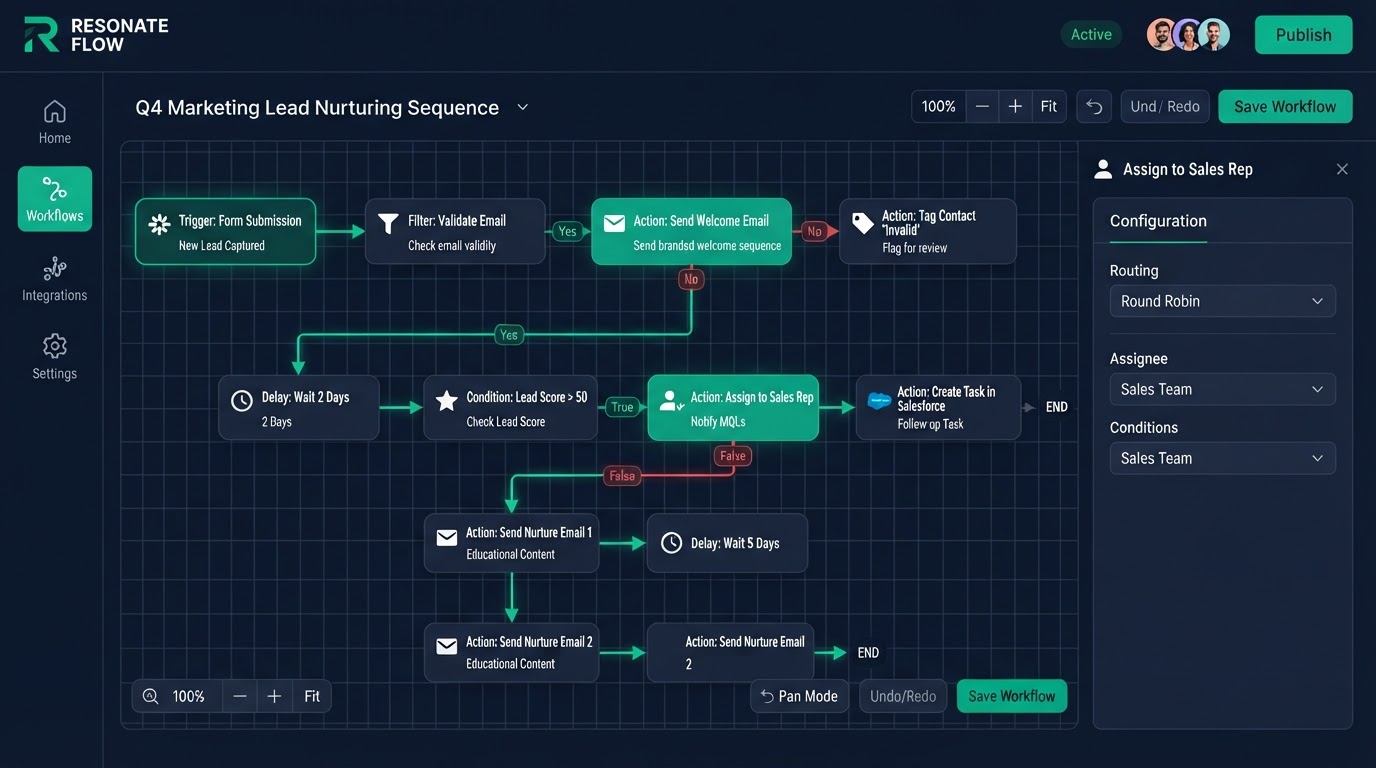
Workflow Automation
We build the workflow logic that connects every trigger to the right action — new lead to instant reply, stage change to task, no-show to rebook sequence — so your CRM works the way your best rep would, 24/7.
Who this is for
Any business that wants to stop manually following up, chasing, and reminding — and let the system do it reliably.
What's included
- Trigger-to-action workflow design
- Multi-channel sequences (email, SMS, voicemail)
- Conditional branching and wait logic
- Task assignment and internal notifications
- Tag-based segmentation triggers
- Error handling and fallback paths
- Loom walkthrough of every workflow
The work that eats your day is the work you should automate
Look at your day and you will find it is full of repetitive, manual tasks — sending the same follow-up, moving the same lead to the same stage, asking the same review question. None of it requires your judgment. All of it requires your time. Workflow automation takes those tasks and hands them to the system. You get your time back, and the work gets done faster and more consistently than a human could do it.
Triggers and actions — the building blocks of automation
Every automation is a trigger and an action. When this happens, do that. A new lead comes in — send a text. A deal moves stages — assign a task. An appointment is missed — start a rebook sequence. We build automations from these simple blocks, chained together into flows that handle entire processes without a human in the loop. Complex behavior, simple building blocks.
Multi-channel — email, SMS, voicemail, and more
A follow-up that only uses email reaches an inbox people check twice a day. A follow-up that uses email, SMS, and voicemail reaches people where they actually are. We build multi-channel automations so your follow-up uses the right channel for the right message — SMS for time-sensitive, email for detail, voicemail for a personal touch. More channels means more responses.
- Email, SMS, and voicemail in a single automation flow
- The right channel for the right message, not one channel for everything
- Branching logic so the flow adapts to how the lead responds
- Time windows so messages send at sensible hours, not 3am
Branching logic that adapts to the lead
A dumb automation sends the same sequence to everyone regardless of what they do. A smart automation adapts. We build branching logic so the flow changes based on the lead's behavior — if they reply, pause and notify; if they click a link, tag them as engaged; if they book, stop the sequence. The automation responds like a human would, not like a blind blast.
Speed to lead, automated
The lead that gets a reply in five minutes is far more likely to convert than the one that gets a reply tomorrow. We build instant-reply automations so every new lead gets a text the moment they opt in, day or night. You do not have to be at your desk to be first to reply. The system is always first.
No spam — smart pause and handoff
Automation that keeps blasting after a lead replies is annoying, not helpful. We build pause-and-handoff logic so when a lead engages, the automation stops and your team is notified to take over. The lead gets a human when they want one, and they do not get spammed by a sequence that does not know they replied.
Who this is built for
This service is for businesses whose day is eaten by repetitive follow-up and manual tasks. If you are sending the same messages by hand and moving the same leads by hand, automation gives you that time back and does the work more consistently than you can.
The process
- 1Day 1
Logic mapping
We map every trigger, branch, and outcome.
- 2Day 2–4
Build
Workflows built and sequenced.
- 3Day 5
Testing
End-to-end trigger and branch testing.
- 4Day 6
Handover
Loom walkthrough + 15-day support begins.
Before & after
Manual follow-up that happened when someone remembered — often days later.
Instant, branching, multi-step follow-up that adapts to every reply and books calls automatically.
Workflow Automation FAQs
Written by certified experts — not AI filler
Every recommendation on this page is based on systems we have actually built and tested for real clients. We document the trigger logic, pipeline stages, and automation flows we deploy — then publish the before/after metrics from live projects. We do not recommend setups we have not delivered ourselves.
Author: CertifiedHighLevelExperts · Reviewed by: Certified GoHighLevel Experts Team · Last reviewed: 2026-09-16
Related topics for Workflow Automation
If you're researching gohighlevel workflow automation, these related terms and concepts come up next. We build all of them inside GoHighLevel.
Primary keyword
Secondary keywords
Related concepts (LSI)
These terms reflect real search intent around gohighlevel workflow automation. We cover each one in the content above and link to the relevant service, industry, or resource page so you can go deeper.
Ready to build your workflow automation?
Fixed price, exact delivery days, and a Loom walkthrough — book your free strategy call today.
Get 1 Month Free + Free Setup + Free Support
Start through our link for an extended 30-day free trial — we'll set up your system and support you free while you test it.